Key Takeaways
- Jewellery manufacturing ERP is software that connects production, BOM, karigar management, metal and stone tracking, costing, inventory and accounts in one system, following each piece from order to finished goods.
- Manufacturers use ERP because metal passes through multiple people and production stages, making it difficult to track balances, losses and actual costs using registers and spreadsheets.
- Core capabilities include bill of materials, production planning, karigar and job work management, loss tracking, stone control, barcode and RFID tracking, material planning, costing and accounting.
- The right system depends on your operation size, production type, use of karigars and subcontractors, required modules, number of locations and preferred hosting model.
- Before choosing a system, check whether it can track metal by stage, calculate actual piece-level cost, manage stones, handle subcontracting, connect production with inventory and accounts, and provide clear reporting.
- Synergics Jewellery ERP (Formerly SEA) fits small, boutique, mid-size and large manufacturers, with 19+ years of experience, 150+ businesses across 9 countries, 25,000+ users and SOC 2 Type II certification.
Introduction
A manufacturer issues gold to a karigar on Monday. By Friday, the finished chain comes back lighter than expected, and nobody can say whether the loss happened at casting, filing, or polishing. The gold is gone, and so is any way to find out why.
Jewellery production is different from ordinary manufacturing because the material itself has significant value and its weight, purity and form can change at almost every stage.
A useful manufacturing ERP therefore needs to answer more than:
How many pieces did we produce?
It needs to answer:
How much metal went into the job, where did it go, what came back, what was lost, what did the piece actually cost, and where is it now?
Table of Contents
- What Is Jewellery Manufacturing Software ERP?
- Why Do Jewellery Manufacturers Need ERP Now?
- What Makes Jewellery Manufacturing ERP Different?
- What Does Jewellery Manufacturing ERP Support?
- How Does AI Help Jewellery Manufacturers?
- How Does Data Flow as a Piece Moves Through Production?
- How Do You Decide Which Jewellery Manufacturing Software to Buy?
- How big is your operation?
- Which production type do you run?
- Do you produce in-house, through karigars, or both?
- Do you need a single module, a full ERP, or one that also covers retail and wholesale?
- Should you choose cloud, desktop, or hybrid?
- What Should You Check Before Choosing Jewellery Manufacturing ERP?
- How Does Jewellery Manufacturing ERP Compare With Spreadsheets and Generic ERP?
- Why Choose Synergics Jewellery ERP (Formerly SEA) for Manufacturing?
- Ready to Run Your Production on One System?
- Frequently Asked Questions About Jewellery Manufacturing Software
What Is Jewellery Manufacturing Software ERP?
Jewellery manufacturing ERP is the system that follows a piece from order to finished goods. It records how much gold each karigar received and returned, what was lost at casting, filing, and polishing, and what the piece really cost to make. So jewellery manufacturing software built this way keeps all of it in one connected record, rather than separate registers and spreadsheets.
In plain terms, it answers four questions every manufacturer asks:
- Who is holding my metal right now?
- How much was lost, and at which stage?
- What did this piece actually cost to make?
- Which pieces are finished and ready to ship?
See the jewellery manufacturing software page for the full feature set.
Why Do Jewellery Manufacturers Need ERP Now?
Manufacturers need ERP because the metal is too valuable to track in registers. Gold changes hands many times before a piece is finished, and each handoff can hide a loss. Its high value and daily price movement make small, unexplained gaps expensive, and paper records can’t explain them afterward.
| Business Problem | ERP Capability |
| Nobody knows who is holding the metal | Karigar and job-wise metal ledger |
| Production loss is visible only at the end | Stage-wise loss tracking |
| Cost is based on estimates | Actual production costing |
| Design changes are missed | BOM and job card linkage |
| Stones are tracked separately | Stone issue and reconciliation |
| Subcontracted work is difficult to reconcile | Job work and subcontractor tracking |
| Stock counts depend on manual entry | Barcode and RFID scanning |
| Purchasing is disconnected from production | Material planning |
| Production and accounts show different numbers | Integrated production and accounting |
| Management depends on multiple reports | Centralized reporting and analytics |
The core shift is connection. Without it, an order passes through registers, spreadsheets, and separate reports before it reaches accounts. With it, one record follows the order from bill of materials to finished goods.
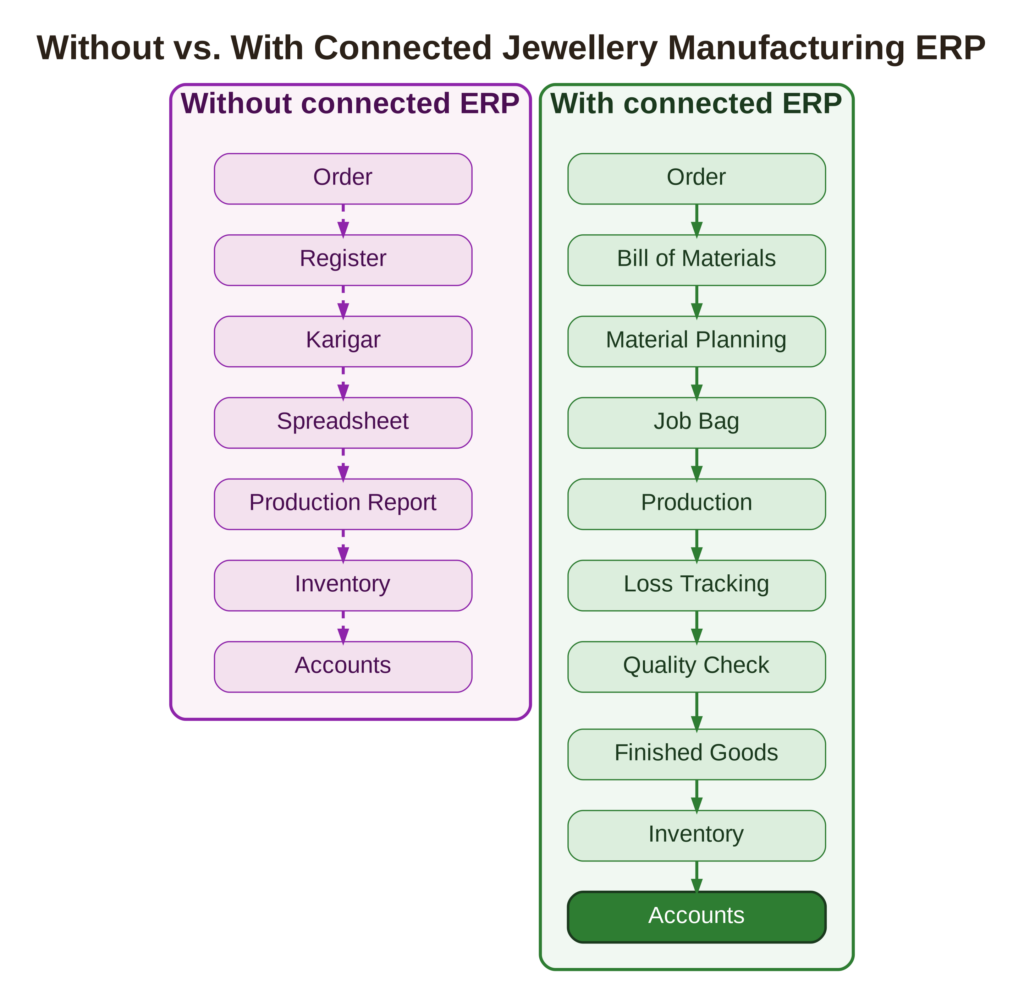
That difference matters because each handoff creates another chance for data to be lost, duplicated, or entered incorrectly.
See our guides to reducing production losses and karigar management.
What Makes Jewellery Manufacturing ERP Different?
Jewellery manufacturing ERP differs from a generic manufacturing system because the material itself changes in weight and value during production. A generic system tracks quantities, work orders, and inventory. A jewellery system also tracks metal weight, purity, and loss at each stage, and holds each karigar accountable for the metal received.
| Generic Manufacturing | Jewellery Manufacturing |
| Tracks quantity | Tracks quantity and weight |
| Material usually stays identifiable | Metal can change form and weight |
| Standard production loss | Stage-specific metal loss |
| Worker output | Karigar-wise metal accountability |
| Product costing | Metal, labor, and stone costing |
| Standard inventory | Metal, purity, stones, and finished-piece inventory |
| General job work | Metal and cash settlement with karigars |
| Product tracking | Individual piece tracking |
| Standard production stages | Wax, casting, tree cutting, filing, soldering, polishing, setting, and quality check |
| General product data | Jewellery attributes such as purity, karat, color, and stones |
This is why choosing software only because it has a manufacturing module may not be enough. The better question is whether it understands the process you actually run.
What Does Jewellery Manufacturing ERP Support?
Jewellery manufacturing ERP supports the whole production cycle: design and bill of materials, planning, job bags, karigar metal, casting and finishing, stone control, costing, and finished goods. It then connects that to inventory and accounts. These are the modules most manufacturers rely on. See the jewellery software ERP features page for every module.
1. Bill of Materials and Costing – Every design carries its metal weight, purity, stone details, and expected wastage. Production costing then compares what a piece should cost with what it did cost. See our BOM guide and costing guide.
2. Production Planning and Process Management – Orders become job bags, the batch cards that travel with the work. Each process, from wax to polishing, is planned and tracked as the piece moves.
3. Material Requirement Planning and Stock Reservation – The system compares open orders with stock, so purchases of metal, alloys, and stones follow real demand. It also reserves material for the jobs that need it. See our procurement guide.
4. Karigar and Job Work Management – The system records metal issued to each karigar against a job, so receipts, wastage against tolerance, labor charges, and settlement all sit on one running ledger.
Loss, Stone, Scanning, and Finished Goods
5. Loss Management, Refining, and Dust Collection – The system records casting loss, tree cutting loss, and process loss at each stage. Also, dust and scrap go to refining, so recoverable metal stays on the books. See our guide to wax consumption and casting loss.
6. Stone Control – The system checks stones against stock before work starts, then issues them with the job and tracks loss. See our diamond inventory guide.
7. Barcode and RFID Tracking – Barcode and RFID tags identify pieces. Scanning supports stocktakes, and variances show up straight away. See our barcode and RFID guide.
8. Finished Goods, Inventory, and Accounts – Completed pieces enter inventory with confirmed weight and cost. Production costs flow into financial accounting without re-entry.
How Does AI Help Jewellery Manufacturers?
AI helps manufacturers by turning production data into answers and early warnings. It can flag unusual karigar wastage, predict stock demand so purchasing follows real orders, and answer a plain question like which design costs the most to make. Without it, someone has to dig through reports to find the same thing.
Where AI helps most in production:
- Flagging wastage that falls outside agreed limits
- Predicting demand for stock and materials
- Answering questions about cost, loss, and output in plain language
- Sending a daily summary of stock alerts and key numbers to your phone
How Synergics approaches it – Synergics combines AI analytics for stock demand prediction and karigar wastage anomaly detection with VISOR, a conversational AI assistant for jewellery businesses. VISOR answers in plain English, draws on over 220 jewellery-specific business questions, sends a daily WhatsApp briefing, and works with any jewellery ERP.
See our analytics guide.
How Does Data Flow as a Piece Moves Through Production?
Data follows the piece. A job bag opens when an order is approved, and every handover after that records what was issued, what came back, and what was lost. Wax, casting, filing, polishing, setting, and quality check each add a line. At the end, a finished piece has a known weight, loss, and cost.

| Stage | What the system records | Loss tracked |
| Order and job bag | Approved order, design, metal type, karat, and color | None yet |
| Wax injection and wax setting | Wax models and trees built for each job, stones checked against stock | Wax and stone use |
| Casting | Alloyed metal calculated per tree, casted tree weighed | Casting loss |
| Tree cutting | Casted models, sprue metal, and loose metal returned to metal control | Tree cutting loss |
| Filing, linking, soldering, assembly | Extra metal, solder, and wire issued and taken back | Process loss |
| Polishing and setting | Production booked, pieces moved between departments | Process loss |
| Quality check | Check parameters recorded, repairs and changes routed to the right department | Repairs tracked |
| Finished goods | Final weight, purity, and cost | Total loss for the job |
The real cost of a piece
Cost builds up through these steps:
Metal + Labor + Stones + Production Loss = Actual Production Cost
At finished goods, you can then compare the actual cost with the quoted cost. This gives manufacturers a clearer view of margins before the piece reaches the customer.
Identification and stock accuracy
Barcode or RFID tags identify each piece, so counts come from scanning, not typing. Handheld readers and smartphone scanning support stocktakes and flag variances, and tag and label printing is part of the workflow. Hallmarking documentation, including HUID records, stays with the piece. Check which scanners and tag types any system supports, because hardware is sourced separately.
For how this connects to wholesale and retail, see Jewellery ERP Architecture: How Data Flows Across Your Business.
How Do You Decide Which Jewellery Manufacturing Software to Buy?
Decide in five steps: your size, your production type, how you use karigars, whether you need one module or a full system, and how you want it hosted. Your answers narrow the choice more than any feature list. Each step below says what to look for.
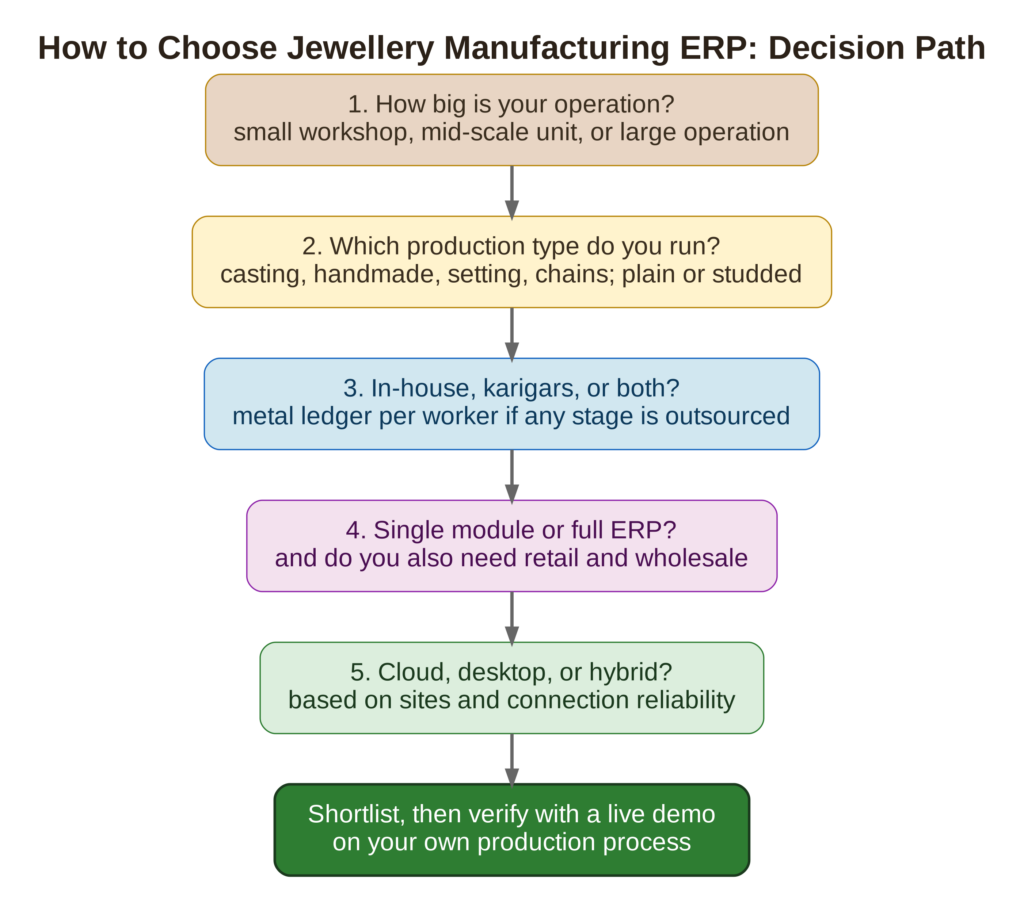
1. How big is your operation?
Size changes priorities, not the need to control metal. A small workshop needs a clear metal ledger and costing, while a mid-scale unit needs tracking across departments. A large operation needs one view across product categories and production teams. Therefore, the right system covers all three without a change of platform.
- Small or boutique workshop: replaces registers and spreadsheets with karigar metal balances, job cards, production tracking, per-piece costing, and finished goods records.
- Mid-size manufacturer: suits several departments, multiple karigars or subcontractors, and more complex material planning. Priorities are process-wise production, stage-wise loss, material planning, stone control, job work, and inventory integration.
- Large operation: needs one view across product categories, production teams, and subcontractors. Priorities are subcontractor management, barcode and RFID tracking, centralized reporting, and analytics.
- Manufacturer who also sells: finished goods move from production into inventory, then into wholesale, retail, or eCommerce sales without duplicate entry.
2. Which production type do you run?
Your production type decides which stages matter most. Casting-led units care about wax, tree weight, and casting loss. Handmade work centers on karigar balances and labor. Setting-led work adds stone control. Chain and coin lines run high volumes, so process-wise loss tracking comes first.
- Plain metal: metal, alloy, and wastage control are the priorities.
- Studded jewellery: stones need their own control, stone-wise loss, and certificates. See our lab-grown diamond guide for how disclosure affects records.
- Mixed lines: check the system handles each category with its own workflow.
3. Do you produce in-house, through karigars, or both?
In-house production needs department-wise tracking from wax to finished goods. Karigar and subcontractor work adds a second need: a metal and cash ledger per worker, with agreed wastage limits. If you outsource any stage, you need both. Spreadsheets struggle most here, because the metal sits outside your own walls.
- In-house only: job bags and department-wise loss tracking
- Full subcontracting: raw material or work in progress handed to a job worker, tracked to settlement
- Partial subcontracting: only some stages outsourced, with in-house stages tracked alongside
- Mixed: one system that covers both without re-entry
4. Do you need a single module, a full ERP, or one that also covers retail and wholesale?
A single module fits when one problem is isolated and the rest of your records already work. A full ERP fits when costing, karigar balances, stock, and accounts need the same numbers. A system that also covers retail and wholesale suits businesses that sell what they make, without re-entering data between teams.
- Single module: solves one task, such as costing, but its data must be copied into other tools.
- Full ERP: production, inventory, and accounts share one set of numbers.
- With retail and wholesale included: finished goods move straight to showroom or trade sales. Check you only pay for what you use. See our guides for retail and wholesale jewellery software ERP.
5. Should you choose cloud, desktop, or hybrid?
Cloud suits manufacturers with more than one unit or location, since everyone works from the same live data. Desktop suits one workshop with stable power and no need for remote access. Hybrid keeps a local copy running during an internet outage and syncs later. Choose by how many sites you run and how reliable your connection is.
Synergics runs on secure cloud infrastructure. See our cloud vs. on-premise comparison.
What Should You Check Before Choosing Jewellery Manufacturing ERP?
Check whether the system treats metal, wastage, and stones as core data, not add-ons. Then check how it handles your karigars, costing, hardware, and compliance rules. Ask for a live demo on your own process, not a sales deck. The table lists what to ask.
| Check | Why It Matters | What to Ask |
| Metal ledger per karigar | Metal sits outside your walls | Does each worker carry a running metal and cash balance? |
| Loss tracking by stage | Loss hides inside the total | Are casting, tree cutting, and process losses recorded separately? |
| Costing from actual data | Quotes built on estimates erode margin | Is cost calculated from real consumption and labor? |
| BOM linked to job cards | Design changes must reach the workshop | Does the job card pull its materials from the BOM? |
| Stone control | Studded work carries high-value stones | Are stones issued, tracked, and reconciled per job? |
| Material planning | Buying should follow real orders | Does it compare orders with stock and plan purchases? |
| Barcode, RFID, and hardware | Scanning replaces manual counts | Which scanners, tags, and printers does it support? |
| Scale and units | Growth shouldn’t force a new system | Can it run several categories, units, and locations? |
| Hosting | Teams need shared, current data | Is it cloud, desktop, or hybrid? |
| Security certification | It holds your costs and formulas | Is it SOC 2 Type II, and can the vendor share the report? |
| Onboarding and support | Migration decides how smooth go-live is | What does onboarding involve, and who helps when something breaks? |
| Pricing clarity | Add-on costs surface late | Is pricing quoted clearly upfront? |
Compliance depends on where you trade
Review the rules in each country you make and sell in. Common areas are tax invoicing, records of metal sent to job workers, and hallmark or purity identifiers.
In India, manufacturers typically look at
- GST-compliant invoicing, covered in our GST guide
- Job work challans and Form ITC-04 for goods sent to karigars, under Section 143 of the CGST Act (GJEPC guide to job work under GST)
- BIS hallmarking with a HUID for each hallmarked piece, covered in our HUID guide
Requirements change, so confirm current rules with your compliance advisers.
How Does Jewellery Manufacturing ERP Compare With Spreadsheets and Generic ERP?
Spreadsheets and generic ERP can record quantities and money, but they weren’t built for metal that changes weight at every stage. Jewellery manufacturing ERP tracks weight, purity, and loss through each process. The table compares the options on what a manufacturer needs most.
| Need | Spreadsheets | Generic ERP | Single-Module Tools | Jewellery Manufacturing ERP |
| Karigar metal balance | Registers kept by hand | Needs custom setup | Only if it is the module | Running ledger per worker |
| Loss by stage | Rarely recorded | Not native | Partial | Casting, tree cutting, and process loss |
| Real cost per piece | Estimated | Needs custom setup | Costing only | From actual metal, labor, and stones |
| Stone control | Separate sheet | Not native | Rarely | Issued and tracked per job |
| Several units | Files per site | Possible with setup | Separate installs | One connected view |
| Reporting | Rebuilt by hand | Standard reports | Limited to the module | Production, stock, and cost reports |
Which fits whom:
- Spreadsheets work for a very small workshop with few karigars and no studded work.
- Generic ERP suits a business whose main need is finance and general manufacturing.
- Single-module tools fit one clear, isolated problem.
- Jewellery manufacturing ERP fits any size once metal, karigars, and cost need to agree.
For named platforms side by side, see our comparison of eleven jewellery ERP providers.
Why Choose Synergics Jewellery ERP (Formerly SEA) for Manufacturing?
Synergics Jewellery ERP (Formerly SEA) is built for the jewellery trade and fits manufacturers of every size, from a single workshop to multi-unit operations, on the same platform. It tracks metal, wastage, and stones through every stage and connects production to costing, inventory, and accounts.
- Every category on one dashboard – Diamond, gold, silver, CZ, chains, and coins each get a specialized production workflow, all managed centrally.
- Job tracking from end to end – Karigar job bags are tracked in real time, with raw metal issue, receipt, and melting losses under strict control.
- In-house and subcontracting – Both are supported, with full or partial subcontracting.
- Loss management – Casting, tree cutting, and process losses are recorded, with refining, dust collection, and diamond and stone loss tracking.
- Integrated costing – Labor (making charges), raw materials, and stone values are calculated and synced with financial accounting.
- Planning and scanning – Bill of materials, material requirement planning, stock reservation, barcode and RFID tags, and handheld and smartphone scanning.
- AI built in – VISOR plus AI analytics for demand and wastage anomalies.
- Mobile access – Apps for Android and Apple devices.
How Synergics Jewellery ERP fits each scale:
- Small or boutique workshop – Job bags, karigar metal ledgers, loss tracking, and per-piece costing in one place, instead of registers.
- Mid-scale manufacturer – Process-wise tracking across wax, casting, filing, polishing, setting, and quality check, with department-wise loss and material planning.
- Large operation – Several categories, locations, and subcontractors on one dashboard, with consolidated costing and reporting.
Forbes India described the ERP as serving businesses of all sizes and types, from major corporations to local enterprises. In a CNBC-TV18 Digital Bharat interview with AWS in July 2022, Vivek Das said the platform serves tier-one players and smaller SMEs in tier-two and tier-three markets. Browns, an international jewellery manufacturer, describes “see through visibility” of production, losses, inventory, and orders.
Track record and security
19+ years, 150+ businesses across 9 countries, and 25,000+ users, on AWS with an Oracle database. Certifications include SOC 2 Type II, VAPT, and a CARE SME 3 rating. Synergics was also named a Top Emerging Business Leader by Times of India and listed in CIO Insider’s 2019 Most Recommended ERP Solution Providers.
Support and pricing
After a free personalized demo, an implementation team handles data migration, configuration, training, and onboarding, with ongoing support and product updates after go-live. Reach the team through the contact page. Pricing is a custom quote based on your size, users, locations, and modules, covering cloud hosting and the platform.
Ready to Run Your Production on One System?
A jewellery manufacturing ERP earns its place when it shows where your metal goes and what each piece really costs. Whether you run one workshop or several units, the first step is the same: see it work on your own process. A free demo is built around how you produce.
Curious where your metal goes between issue and finished piece? Book a free demo or talk to the Synergics team about your workshop.
Frequently Asked Questions About Jewellery Manufacturing Software
Questions About the Basics
1. What is jewellery manufacturing ERP?
It is the system that follows a piece from order to finished goods, recording metal issued and returned, loss at each stage, and the real cost of making it, all in one connected record.
2. What is jewellery manufacturing software used for?
It is used to plan production, track karigar metal, record wastage and loss, control stones, calculate the real cost of each piece, and move finished goods into inventory and accounts.
3. Is jewellery manufacturing ERP suitable for small workshops?
Yes. A small workshop gains most from a metal ledger per karigar, job cards, and per-piece costing. A scalable system covers that and grows to several units without a change of platform.
4. How does it track karigar metal and wastage?
Metal issued to a karigar is recorded against a job. On return, finished weight and wastage are checked against the agreed limit, and a running balance shows what is outstanding.
5. Where is metal lost during production?
Loss occurs at casting, tree cutting, filing, soldering, polishing, and setting. The software records each loss separately, so you can see which stage is leaking.
Questions About Production and Compliance
6. Can it calculate the real cost of a piece?
Yes. It builds cost from actual metal, labor charges, and stone values, then compares it with the quoted cost at finished goods.
7. Does it work for plain metal and studded jewellery?
Yes, if it has stone control as well as metal control. Check that stones are issued, tracked, and reconciled per job alongside metal.
8. Can it manage subcontractors and job workers?
Yes. Full and partial subcontracting are tracked process by process, with a metal and cash ledger for each worker through to settlement.
9. Does it support barcode and RFID tracking?
Yes. Barcode and RFID tags identify pieces, and handheld or smartphone scanning supports stocktakes and flags variances. Hardware is sourced separately, so check which scanners and tags a system supports.
10. Does it handle hallmarking and compliance?
It should keep hallmark records, including HUID in India, and support the tax and job work rules of each country you operate in. Rules vary, so confirm with your advisers.
Questions About Choosing and Buying
11. Do I need a full ERP or a single module?
Choose a single module when one problem is isolated. Choose a full ERP when costing, karigar balances, stock, and accounts need to agree.
12. Should I choose cloud, desktop, or hybrid?
Cloud suits several units or locations. Desktop suits one workshop with stable power. Hybrid keeps a local copy running during outages. Synergics runs on secure cloud infrastructure.
13. Does it include AI analytics?
Some platforms do. Synergics includes AI analytics for stock demand and karigar wastage anomalies, plus VISOR, a conversational assistant that also sends a daily WhatsApp briefing.
14. How much does it cost, and how long does implementation take?
Both depend on your size, users, locations, and modules. Synergics gives a custom quote and confirms a clear timeline after understanding your setup, before you commit.